 |
| Navigation Bar |
| World • Characters • System • Unit Types • Skills • Missions • FAQ |
When starting a new game, you are immediately presented a choice of turning the adjacency restriction on or off. If it's set to On (top choice), then movement becomes impaired near enemy units. It won't affect flying units nor units that have Cut skill.
Basic Gameplay
The system in Ohzoku is broken down to 2 points, mission selection and battle.
Mission Selection (ミッション選択)
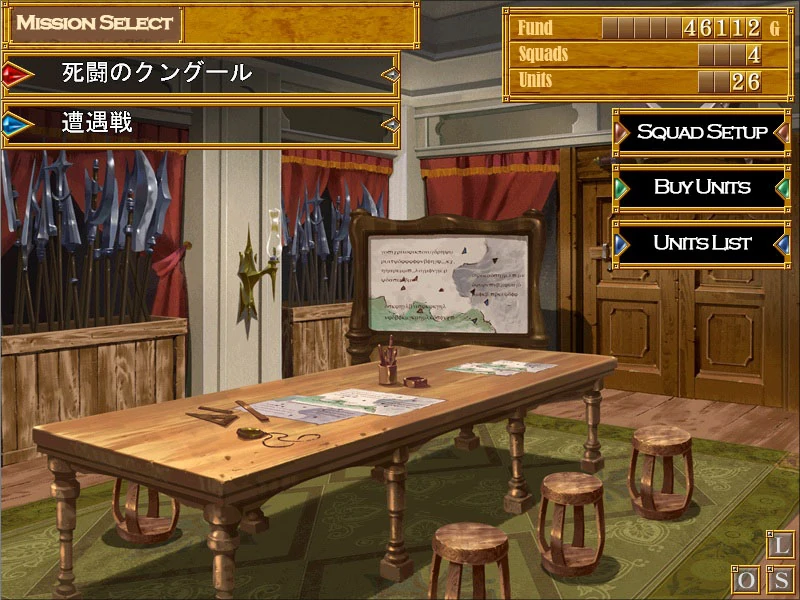
Please look at the picture for easier navigation.
On the left side of the screen is a list of available missions/events. Missions marked in red are storyline-missions, missions marked in blue are side-missions, while missions marked in black are events (not necessarily H). Take note that side-missions don't advance the story and mostly used for grinding purpose. As the difficulty of storyline-missions scales as the story progresses, it is suggested to always keep all combat units properly-leveled via side-missions grinding, more specifically with Rigorous Training (厳しい実践訓練) mission.
On the upper right of screen, a panel lists the current army stats:
- Fund
- Squads
- Units
Just below the aforementioned options, there are 3 buttons that mainly feature units-management function:
- Squad Setup
You will see a list of current existing squads in your army. The header of each shows the name of the squad, which is editable via the green button next to it. There is also number signifying the deployment cost for each squad on the right-most area of the header.
- The green button on the right side of each squad will dismiss the whole squad.
- The blue button's function is to edit the selected squad.
- Buy Units
- Units List
Mission (Battle)
With your squads ready, it is time to confront the opponents.
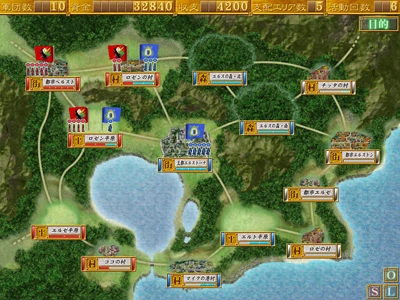
To the left is an example of battle layout. Every mission has a primary objective that you have to complete, be it to conquer a specific location, find certain items, explore certain areas, or conquer all territories within the land. In order to claim a territory for your own, you need to assign a squad and make them occupy that area for specific number of turns; the number of turn required to take control of an area is indicated by the blue bar just below the area's name.
If an area is already occupied by enemies, you need to eliminate all of them before you can claim it. Because the number of squads you can bring to a mission and turns you may take is limited, you need to calculate your moves and initiate the most efficient way to engage opponents because you will most likely be outnumbered in almost all of scenario.
Combat

.jpg)
.jpg)
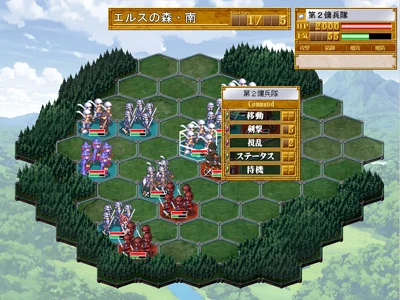
Upon engaging enemy squads during mission, you will be presented with a screen such as the picture to the right.
Every class has specific movement range; the higher it is, the more areas your units can cover in one turn movement. When an enemy unit is within effective range of your unit, you will be able to use your offensive skills to dish out damage. Know-who and know-how are pretty important to formulate strategy. With that being said, please refer to Unit Types for further explanations.
General Tips
Below is a list of general tips. Please keep in mind that these points don't always have to dictate your approach on the game. Being able to read situations and adapt is highly encouraged.
Save often for safety precaution, both in mission selection screen and battle.
Preserve your units. It is encouraged to take the safest approach possible, especially at the early portion of the game in which your units hardly have advantages over enemies.
Always have at least 2 units that can heal in 3 squads.
Plan your formation as versatile as possible. While skill build mostly dictates unit's use, they still have their own default role. Formulate your units to complement each other.
In combat, the priority on which enemy type to dispatch first goes from the most offensively proficient to the least considering you are most likely going to be outnumbered in some missions, so conserving your units' longevity should always be the primary objective.
Usually, opposing mages will always be the first priority, then followed closely by cavalries.